
How to Use Instagram Grid Pinning?
In a time where first impressions on social media matter more than ever, knowing “how to use Instagram Grid Pinning?” can help you stand out. Not using grid pinning can bury your best content, reducing visibility, engagement, and sales. It may make your profile look disorganized, causing visitors to leave and missing chances to build trust, attract followers, and drive conversions, which can halt your growth.
What Is Instagram Grid Pinning?
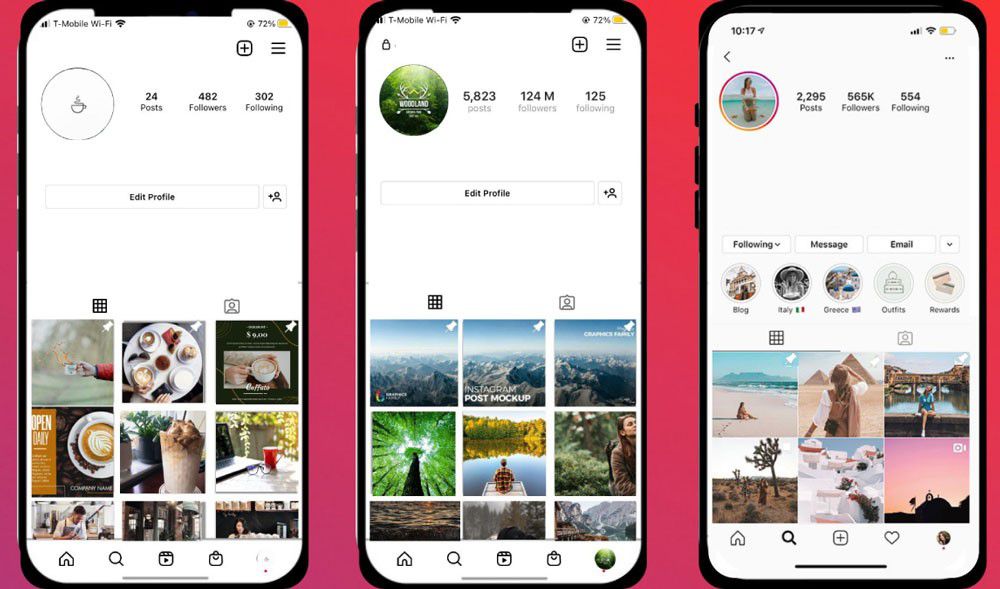
Pin posts on Instagram is a feature that allows users to select three posts to stick to the top of their feed. These can be static image posts or reels, and they remain visible above newer posts, ensuring they get ongoing attention. Like Instagram Highlights, this new feature adds a layer of profile customization, helping businesses optimize their Instagram pages to drive results like clicks, saves, comments, or even purchases.
Why Instagram Grid Pinning Matters in 2025?
In 2025, first impressions on Instagram are key. Grid pinning lets you control your profile by showcasing your best posts, like product launches, top-performing Reels, or testimonials at the top.
- Highlights your brand’s value instantly.
- Boosts engagement and conversions.
- Builds trust with new visitors.
- Keeps essential content visible.
It’s like a storefront; pin what you want people to see first. Use it wisely.
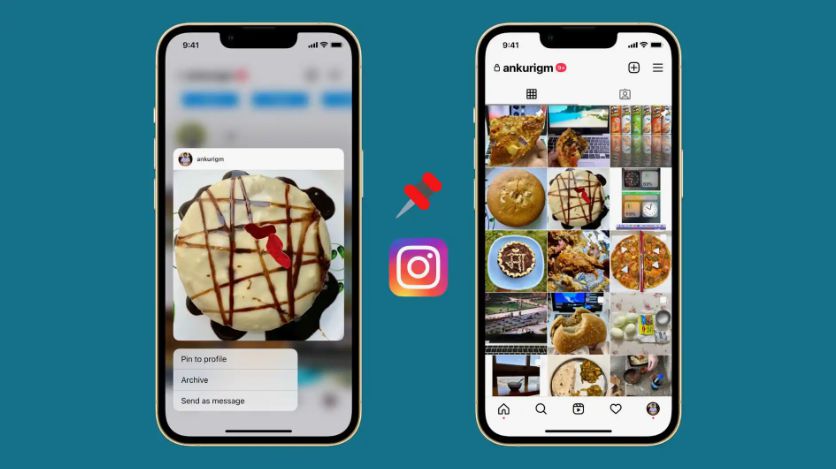
How to Pin a Post on Instagram?
Pinning a post on Instagram is quick and easy, and it can make a big difference in how visitors experience your profile. Follow these simple steps to get started:
- Head to the post you’d like to pin.
- Tap the three-dot menu in the top right corner.
- Select “Pin to your profile.”
- Done! That post now sticks to the top of your grid.
Notes on Using Grid Pinning
- Unpinning a post will return it to its original spot on your grid.
- New posts will appear after pinned posts.
(4) Strategic Ways to Use Instagram Grid Pinning to Boost Engagement in 2025
If you’re ready to level up your profile but unsure what to pin, identify the content that best represents your brand. Then, define the specific action you want profile visitors to take when they land on your page. Once you’ve done that, you’ll know exactly what belongs in your top three.
ü Promote Events, Launches, or Time-Sensitive Offers
Running a product launch, seasonal promotion, or event? Use your grid pins to create urgency and Instagram visibility. You can pin countdown posts, launch teasers, or a video walkthrough of your new product. This tactic is perfect for driving action directly from your Instagram profile, whether registering for a webinar or shopping for a new collection.
ü Drive Sales or Inquiries with Instagram Grid Pinning
If your goal is to convert Instagram traffic into clients or sales, pin posts that showcase your services, client testimonials, or limited-time offers. A mix of promotional content and social proof helps guide visitors down the conversion path. Make sure these posts include clear calls-to-action like “Book Now,” “DM for Details,” or “Link in Bio.”
ü Showcase Your Brand’s Identity
Your top three posts should tell a story. For example, include a behind-the-scenes reel, a post featuring your core values, or a video welcoming followers. Pinned posts become even more effective when paired with a professional Instagram profile. You may also enjoy our guide on Creative Ideas for Instagram Highlights to improve your profile appearance.
ü Highlight Your Most Engaging Content
Take advantage of posts that already performed well. Pinning top-performing posts (with high saves, shares, or comments) ensures new visitors see what resonates best with your audience. It’s one of the easiest ways to increase dwell time on your profile and signal value from when someone lands on your page.
If you aren’t sure which posts deserve to be pinned, learn how the latest Instagram algorithm works in our complete guide about Instagram New Features.
What Are the Common Mistakes should Be Avoided for Using Grid Pinning?
While Instagram Grid Pinning is powerful, using it poorly can backfire. Avoid these common mistakes:
- Pinning outdated content: Keep it fresh and relevant.
- Lack of strategy: Don’t pin random posts. Choose ones that align with your goals.
- Over-promoting: Too many sales posts can feel pushy. Balance with value.
- Ignoring performance: Swap it out if a pinned post isn’t engaging.
- Forgetting to update: Revisit your pins regularly to match current campaigns.
Treat your pinned posts like a storefront display and update them based on what you want to showcase now. Many creators also make mistakes by pinning posts with weak captions. Learn how to write captions that increase engagement in our article about How to Write an Instagram Caption.
Final Thoughts
Using the Instagram pin feature is a smart way to optimize your profile, elevate important content, and improve the overall user experience on your Instagram page. Whether you aim to grow your audience, increase conversions, or build trust, handling how to use it can be a valuable addition to your Instagram content strategy. Have you started using this feature or seen any creative uses from brands you follow? Share your experiences with “How to use Instagram Grid Pinning?” below.
Optimize Your Instagram Profile Even More
Grid Pinning is only one part of building an attractive Instagram profile. Explore our complete collection of Instagram guides to improve engagement, profile design, hashtags, captions, Stories and Reels. —-> inscopy
Can you pin Reels on Instagram?
Yes, both reels and static posts can be pinned.
How do you choose what to pin on Instagram?
Pin content that reflects your brand performs well and supports your goals.
Do pinned posts on Instagram stay forever?
They stay pinned until you unpin them manually.
Are followers notified when I pin an Instagram post?
No, Instagram doesn’t notify followers when you pin or unpin.
Is Grid Pinning on Instagram available to everyone?
Yes, the latest app version is available to all Instagram users.