
Drowning in Instagram DMs? From old group chats to unread customer messages and random one-liners, your inbox can get out of hand fast. If deleting Instagram messages one by one sounds like your personal nightmare, take a breath;
We’ve got smarter ways to help you clean it all up without spending hours doing it with our article “How to delete all chats in Instagram in 2026?”. Read on to discover how to declutter your Instagram inbox without the headache.
Can You Delete All Instagram Messages at Once?
As of 2026, Instagram does not offer a one-click option to delete all chats in Instagram at once across all devices.
Bulk deletion is limited to selecting multiple chats manually on mobile apps only. On a desktop, and for deleting messages from both sides, the process remains individual and manual.
Instagram Chat Deletion Quick Guide (2026)
| Question | Quick Answer |
|---|---|
| Can you delete all Instagram chats at once? | No. Instagram does not provide a one-click option to delete all conversations permanently. |
| Can I delete multiple Instagram chats together? | Yes. On the Instagram mobile app, you can select multiple conversations and delete them together. |
| Does deleting an Instagram chat remove it for both users? | No. Deleting a conversation only removes it from your inbox. The other person can still see the chat. |
| How can I remove messages from both sides? | Use Instagram’s Unsend feature to remove individual messages from both users’ chat history. |
| Can I delete Instagram chats from desktop? | Yes, but desktop currently requires deleting conversations individually instead of bulk selection. |
| Can deleted Instagram chats be recovered? | No. Once a conversation is deleted from your inbox, it cannot be restored through Instagram. |
| Is using automation tools safe for deleting Instagram messages? | Be careful. Third-party automation tools may create security risks or violate Instagram rules. |
4 Methods To Delete All Instagram Chats in 2026
Overflowing Instagram DMs can be a real trouble, but fear not, there’s hope! Although Instagram doesn’t let you delete all messages at once, you can still clear your inbox efficiently. Dive in and take control of your Instagram chats today with these methods!
Bulk Delete Multiple Chats at Once (Mobile Only)
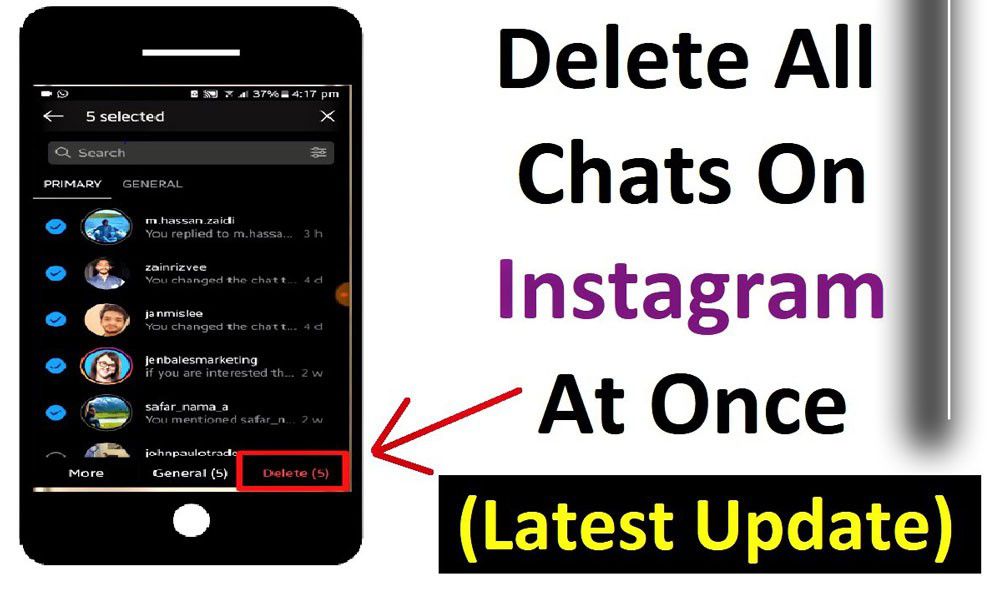
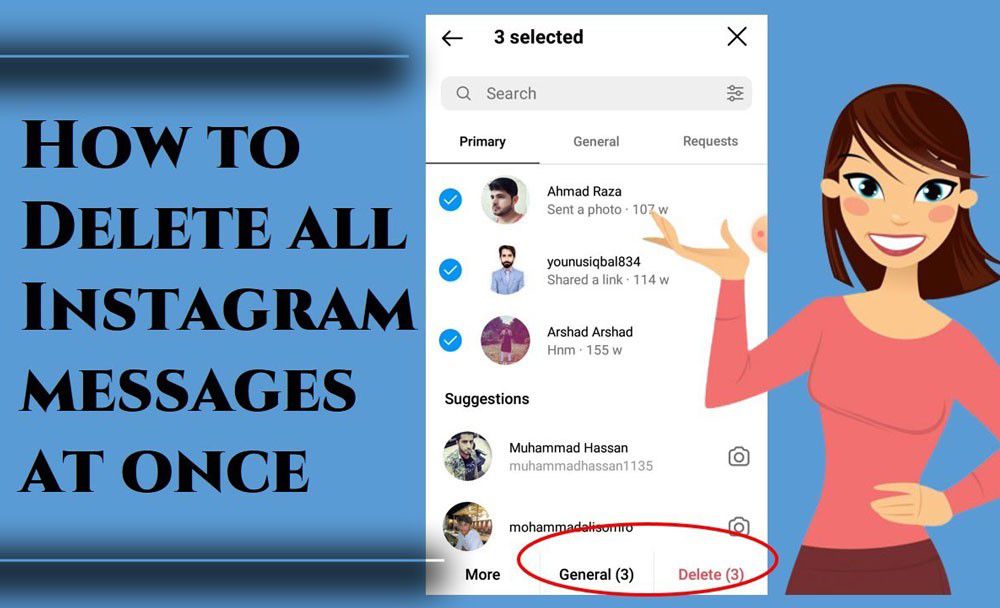
If your goal is to mass delete Instagram chats or at least clear many conversations quickly, the Instagram app on iOS and Android provides the most effective bulk deletion option.
- Open Instagram and navigate to your Direct “`inbox.
- Tap the icon for multiple selections, which usually looks like checkboxes or stacked lines in the top-right corner.
- Select all the chat threads you want to delete.
- Tap Delete at the bottom of the screen.
- Confirm your decision.
What does this do?
- Quickly deletes multiple conversations from your Instagram inbox at once.
- Does NOT remove messages from the other participants’ inboxes.
- Saves time compared to deleting conversations one by one.
Limitations
- Other users will still retain their chat history unless they delete it too.
Deleting Chats One by One (Desktop & Mobile)
If you want to delete all chats in Instagram on desktop or prefer to remove them selectively, clearing conversations individually is the fallback option. Although slower, it gives you precise control over your Instagram DM inbox.
On Desktop
- Go to Instagram.com and open your DM inbox.
- Open the chat you want to delete.
- Click the three-dot menu (⋮) in the top-right corner.
- Select Delete Conversation and confirm.
On Mobile
- Android: Press and hold the chat, then tap Delete.
- iPhone: Swipe left on a chat and tap Delete.
Limitations
- No bulk delete on desktop, so you can’t truly delete all chats in Instagram at once on this platform.
- Deleting chats one by one is time-consuming if you have many conversations.
- This manual method is essential when you want to remove Instagram chats individually or manage your inbox from a computer.
Unsend Messages (Remove from Both Sides)
To delete individual Instagram messages, you can use the Unsend Feature. Sometimes, instead of deleting entire conversations, you might want to recall Instagram messages or remove specific messages from both your inbox and the recipient’s. Instagram’s unsend messages feature lets you do this message by message.
- Open a conversation thread.
- Hover over your message or tap and hold it on mobile.
- Click the three-dot menu and select Unsend.
- Confirm the action.
Important Notes
- This removes the message for all parties, unlike deleting a conversation, which only removes it from your account.
- You must unsend messages individually; there is no bulk unsend.
- Instagram stores deleted messages for up to 90 days for moderation.
- The recipient might have already seen or saved the message.
Delete All Instagram DMs Automatically Automation Tools: Risks and Consideration
Since Instagram doesn’t allow you to delete all Instagram messages in one go, you can use tools like AutoClicker for Instagram to automate the process. This method works on both Android and iOS.
- Download and open AutoClicker from your device’s app store.
- Enable Multi-Target Mode.
- Open your Instagram DMs screen.
- Press and hold the green plus button in AutoClicker to create your first tap point.
- Set the point on the first chat.
- Add another tap point for long-pressing the chat.
- Set delays (for example, 1000 milliseconds) to give Instagram time to react.
- Add a tap point to hit the Delete button in the context menu.
- Save the configuration as an AutoClicker script for Instagram.
- Tap the blue Run button to execute your automatic message deletion.
With AutoClicker, you can delete Instagram messages automatically; no manual tapping is required for every chat. This is especially helpful if you’re trying to handle Instagram DM clutter or delete dozens (or even hundreds) of conversations at once.
Before using any third-party automation tool to manage Instagram messages, keep in mind that security should always come first. Some tools may ask for your Instagram login details, which can put your account information at risk.
Instagram does not officially recommend giving your password to external services. If you decide to use any automation method, check the tool carefully and avoid services that require unnecessary access to your account.
(2) Safer Alternatives to Delete All Chats in Instagram Efficiently
When managing a busy Instagram inbox, finding safe and effective ways to clear chats is essential. These alternatives help you maintain privacy and reduce clutter without risking your account security.
Use Instagram Vanish Mode for Auto-Deleting Messages
Instagram’s Vanish Mode is a privacy-focused feature that helps you automatically Clear All Instagram conversations once closed.
This mode is perfect for users who want messages to disappear after being read, reducing the need for manual deletion.
- Option 1: Swipe up within a one-on-one chat until the screen changes to a dark background.
- Option 2: Tap the “i” icon in the chat and toggle Vanish Mode on.
Keep in mind that Vanish Mode is only available for individual chats, not group conversations. Also, messages deleted through Vanish Mode cannot be recovered, so use it carefully.
Block Unwanted Users to Prevent New Messages
If someone is spamming your inbox and you want to stop the flow of unwanted messages altogether, blocking the user is the most effective solution.
- Long-press a message from the user.
- Tap Report and follow the prompts if necessary.
- Select Block Username.
Once blocked, the person won’t be able to send you new messages. Messages sent while blocked will remain in your chat history but won’t be delivered to you. Blocking helps maintain a clean inbox without constantly deleting messages from unwanted contacts.
9 Bonus Tips and Important Notes Before You Remove All Chats in Instagram
Keep your DMs neat and tidy with these expert tips and crucial insights before you attempt to delete all chats in Instagram.
- Use batch delete on Instagram mobile regularly to keep your inbox manageable and clutter-free.
- Consider Instagram automation tools for businesses to reduce DM clutter by redirecting users to FAQs or contact forms.
- Regularly unsend sensitive or mistaken Instagram messages to remove them from both your and the recipient’s inbox.
- Remember, deleting Instagram messages only removes them from your side unless you use the unsend feature.
- Unsending messages on Instagram doesn’t prevent others from taking a screenshot or forwarding the message.
- Forwarded Instagram DMs may still exist in other chats even after being unsent.
- Users often receive Instagram message notifications even if the message is quickly unsent.
- On iOS, users in the Primary Instagram inbox might see a notification when a message is removed; Android Instagram users may not.
- You can also remove story reactions and mentions from Instagram chats, but these won’t disappear from your Instagram activity tab.
Conclusion
Instagram chats can pile up fast, but managing your inbox doesn’t have to feel overwhelming, thanks to our tutorial “How to delete all chats in Instagram in 2026?”
With a few smart moves and the right tools, you can keep your conversations organized, reduce distractions, and make room for what really matters.
Time to tidy up? Start now and give your inbox the refresh it deserves. What’s your go-to strategy for clearing clutter? Let us know in the comments, or ask a question if you’re stuck; we’re here to help!
Can you delete all Instagram DMs at once?
No, Instagram doesn’t offer a one-click “delete all” feature; only batch delete on mobile is available.
How do I delete multiple messages on Instagram DM in 2026?
Use the mobile app, tap the multi-select icon, choose chats, and tap “Delete” to remove several at once.
How do I clear my Instagram messages?
You can clear messages by either bulk-deleting chats on mobile or manually deleting one by one on desktop.
How to delete messages on Instagram from both sides?
Use the “Unsend” feature on each message to remove it from both your and the recipient’s inbox.
Are third-party Instagram message deletion tools safe?
Most third-party tools for bulk deleting Instagram messages pose security risks and can lead to account suspension or data breaches.
For better control over your social media accounts, you can also learn more about Threads app deletion and deactivation and how Meta account management works.
Managing Instagram messages is easier with the right tools. inscopy provides simple Instagram tools to help users manage and save Instagram content online.